Player Reports
This support page explains how to correctly report players, and what evidence is required
We do not enforce roleplay rules.
If you're looking for a stricter roleplay experience, join one of the many private servers available!
If a player violates one of our official in-game rules, you can report them using our Player Report Form.
Before submitting a report, make sure the behaviour you are reporting actually violates one of our rules.
-
Make sure the reported player's username has been entered correctly
-
Enter their full username, not their display name
-
Make sure your evidence clearly shows the rule violation
-
If the reported player doesn't exist, the report is refused immediately.
Evidence Requirements
Our moderation team will only take action when there is sufficient evidence to verify both the rule violation and the identity of the player reponsible.
- The player's full username should be visible
- Their display name and avatar should also be visible where applicable
- The evidence must clearly show the reported rule violation
- The version date in the bottom-right corner must be visible
The full username is extremely important.
Display names are not unique and cannot be used to identify a player. Evidence that does not allow us to confirm the reported player's identity may be rejected.
A player's full username can be shown through the player list or through the police application. Alternatively, moderators in private servers may use the ESP command to display a player's full username.
In some situations, we may be able to verify a player's identity without their full username, however, you should always show the full username whenever possible.
If the player is in a vehicle, you may need to get additional evidence.
Ensure their nametag is visible then show their full username using the player list or police application.
If their nametag is not visible, a police officer must search the vehicle's license plate through the police application and show the profile of the player who owns that vehicle.
You may submit evidence that was recorded by a friend or another player.
If the evidence was not recorded by you, please mention this in the Additional Information section of the report form. This allows our moderation team to contact the person who originally recorded the evidence if further information is required.
Do not submit duplicate reports. You may attach multiple pieces of evidence to a single report, so there is no need to submit several reports for the same player and incident.
Evidence Format
The report form accepts both videos and screenshots, although video evidence is strongly preferred in most situations.
This is the preferred evidence format as it allows our moderation team to easily review the evidence.
Screenshots are often insufficient and will result in the report being rejected in most cases.
Medal, Youtube, Streamable, and Google Drive links should be avoided where possible, however we do accept them if you are unable to upload the video directly.
-
At least one video is required, either as a file or as a YouTube / Streamable / Medal link.
-
Up to 10 images & videos per report.
-
Upload errors return short messages instead of an HTML error page.
Additional Information
The Additional Information section should only be used when there is extra context that may help our moderators to understand your report.
If your evidence clearly shows the violation and no additional explanation is necessary, you may leave this section blank.
You are not required to provide timestamps.
Reject Reasons
If you have not provided us with sufficient evidence, your report will be rejected.
Our moderators determined that the evidence provided was not sufficient to take moderation action against the reported player.
Your evidence did not clearly show the reported rule violation, the player's full username, or both.
The screenshot provided did not contain enough context to confirm the reported violation.
Our moderators could not identify any violation of our in-game rules in the evidence provided.
The reported player has already been banned.
This report concerns a Roblox Terms of Service violation rather than a violation of our in-game rules. Please report the player directly to Roblox so their moderation team can review it.
If you believe your report was rejected incorrectly, you may contact one of our moderators through our Discord server. We can review the report and explain why the evidence did not meet our requirements.
Report Notifications
Review Times
Our moderation team generally reviews player reports within 1-3 days. Review times may occassionally be longer during holiday seasons.
If you would like to receive updates about the outcome of your reports, make sure game notifications are enabled for Emergency Hamburg.
Report outcomes are sent through Roblox notifications.
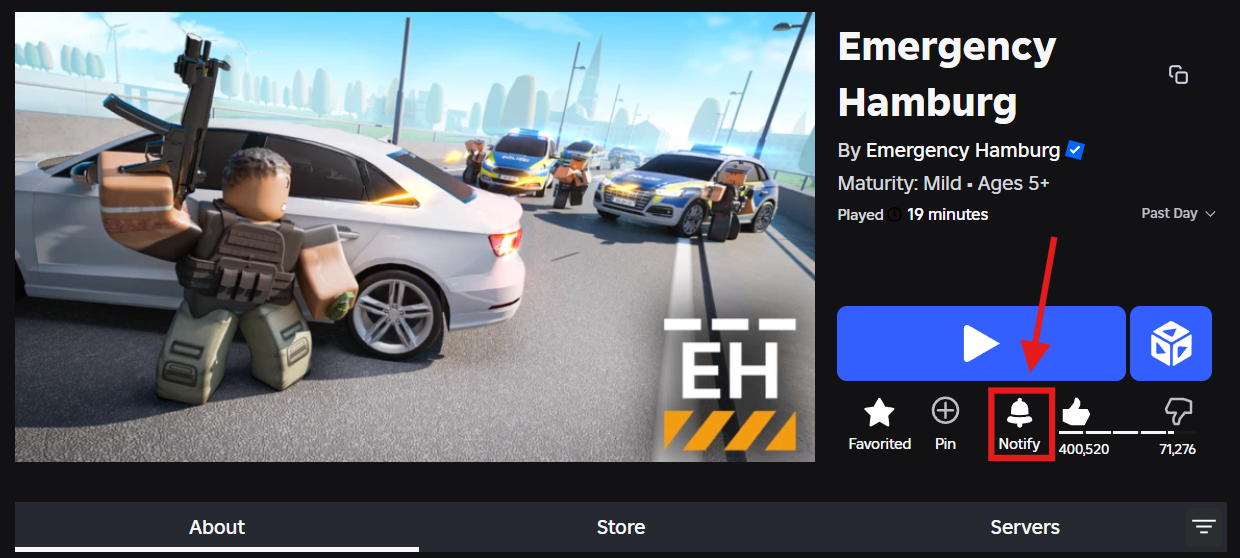
Only one report notification can be sent every 24 hours. If you submit multiple reports within the same 24-hour period, you will only receive a notification for one of them.
If you would like to know the outcome of another report, you may contact one of our moderators through our Discord server.