Official Parent Guide
A guide for parents and caregivers outlining gameplay, safety features, communication, and in-game purchases in Emergency Hamburg
German Version Available
This page is also available in German. Click here to access it
About
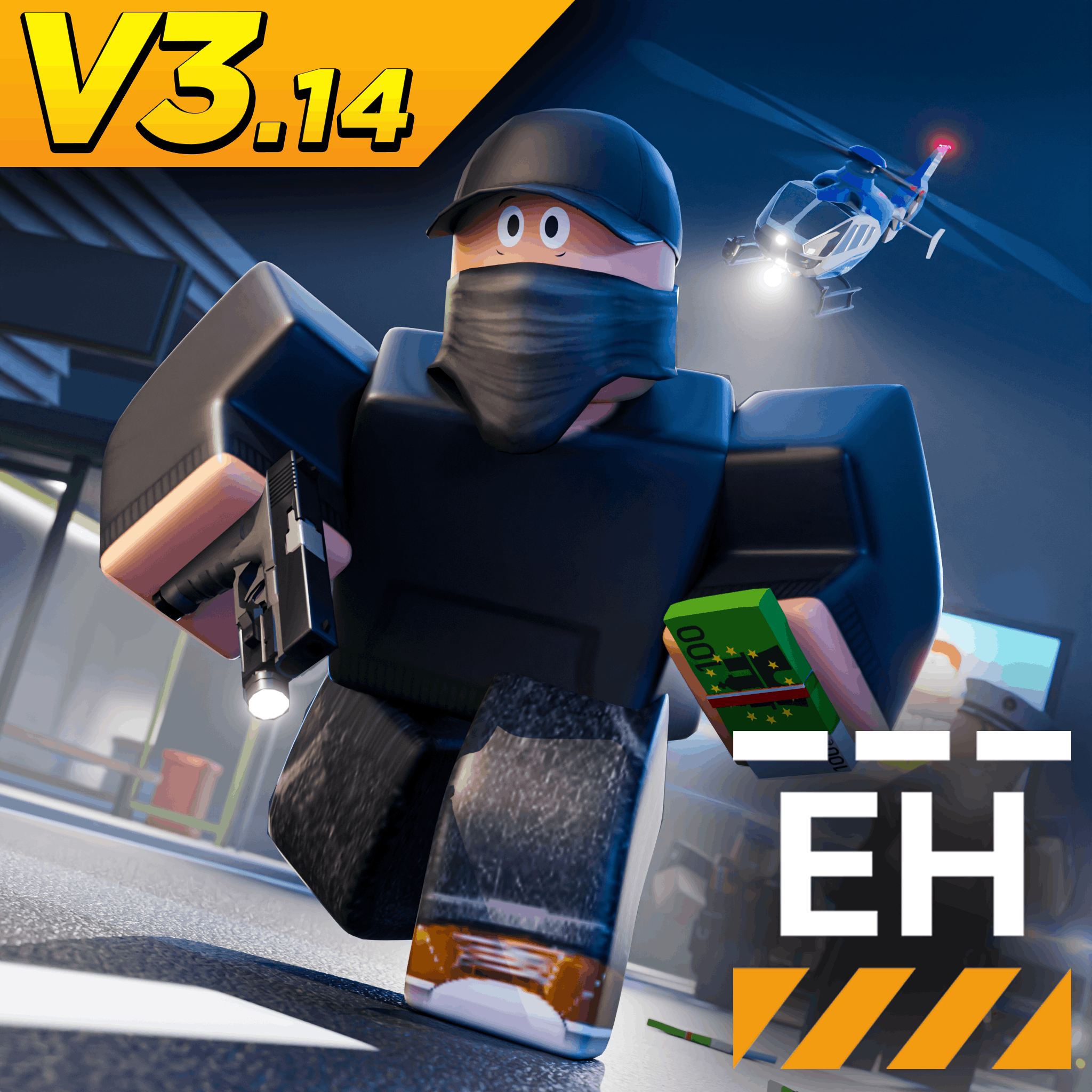
Emergency Hamburg is an emergency services role-playing game in Roblox, set in the German city of Hamburg.
Players can choose to take on different roles, such as being a police officer, civilian, firefighter, medic, bus driver, car mechanic, truck driver, or even a criminal.
Players earn virtual in-game currency by completing work shifts in their jobs, or taking part in other activities. This currency can be used to purchase new vehicles, and unlock additional content that helps them progress in the game.
Players can explore the city, take part in different jobs, and interact with other players in Emergency Hamburg.
You can find answers to many common questions in our support wiki:
Age Rating & Content[1]
Emergency Hamburg follows the official age rating guidelines provided by Roblox, which classify the game under 'Mild' content. These maturity labels[2] are designed to help ensure that games are appropriate for their intended audience.
Our game includes weapons, and police equipment, which means that mild violence may occur in-game.
There is no depiction of blood, graphic injury, or explicit violence.

We recommend Emergency Hamburg for players aged 9 and above. The game's content is designed to remain appropriate for younger audiences, whilst also providing a somewhat realistic experience.
To ensure this, we encourage parents to make sure their child's Roblox account uses the correct date of birth.
Player Safety
To help keep players safe, we use both in-built safety tools from Roblox, and additional features developed by our own team.
Protecting our players is a priority.
Safety Features
Emergency Hamburg is part of Roblox, which provides a range of in-built safety features designed to help parents manage their child's experience. These include features such as account & chat restrictions, spending controls, etc.
Parents and caregivers can learn more about these features in the official Roblox guide:
These settings allow parents to restrict certain experiences, and manage how their child interacts with other players on the platform.

Our moderation team actively review reports and investigates rule violations in-game to protect our community. To help protect players, we:
- Review player reports submitted through our report form
- Investigate any behaviour that may violate our in-game rules or the Roblox Community Standards
- Work to resolve reports as quickly as possible
This allows us to maintain a safe, and enjoyable environment for players of all ages.
Reporting rule violations
If you, or your child encounters inappropriate behaviour, scams, or any other rule violations, reports must be submitted through Roblox.
Roblox actively review these reports, and may take action depending on the severity of the violation.
You can learn more about how to report users on the platform here:
In addition, we have our own in-game report form, which can be used to report in-game rule violations. Reports submitted through this form are reviewed by our moderation team, usually within one day.
You can report in-game rule violations here:
For a full overview on how to report users on our Discord server, please see:
Roblox Community Standards
All players in Emergency Hamburg are expected to follow the Roblox Community Standards, which apply to every game across the platform. These rules are designed to help keep players safe, and welcome while playing.
Violating these guidelines may result in limited access to features, or a temporary / permanent suspension of your child's account on Roblox.
Some key points include:
- No bullying or harassment
- Any sharing of personal information is prohibited
- No inappropriate content
For a full overview of Roblox's guidelines, parents and players can visit:
Our In-Game Rules
In addition to Roblox's platform rules, Emergency Hamburg has its own set of guidelines to ensure a safe, and fair experience for all players, such as:
- No cheating or exploiting
- Impersonation of staff members is prohibited
As our community grows, and Emergency Hamburg continues to evolve, our in-game guidelines are subject to change.
These rules apply to all players, and violations may result in a permanent suspension of your child's account from our game.
For a full overview of our in-game guidelines, please visit:
Other Platforms
Roblox can also be played on several different platforms, which provide additional parental control tools that allow parents to manage their child's online experience.
Parents can learn about these features here:
- iOS / Apple: https://support.apple.com/en-us/105121
- Google / Google Play: https://support.google.com/googleplay/answer/1075738
- Microsoft / Xbox: https://www.xbox.com/en-US/family-hub
- Playstation: https://www.playstation.com/en-us/support/account/ps5-parental-controls-spending-limits/?country-selector=true
Accessibility
Emergency Hamburg features a range of accessibility features to make the game more comfortable for all players. These settings can be customised in-game via the settings application.
Some of the accessibility features available include:
-
Flashbang (Dark Mode)
Replaces the bright white screen with a darker screen when a player is hit with a flashbang - for those who are sensitive to bright light -
Disable Camera Shake
Removes camera movement during events, such as explosions - for players who may experience discomfort from screen shaking
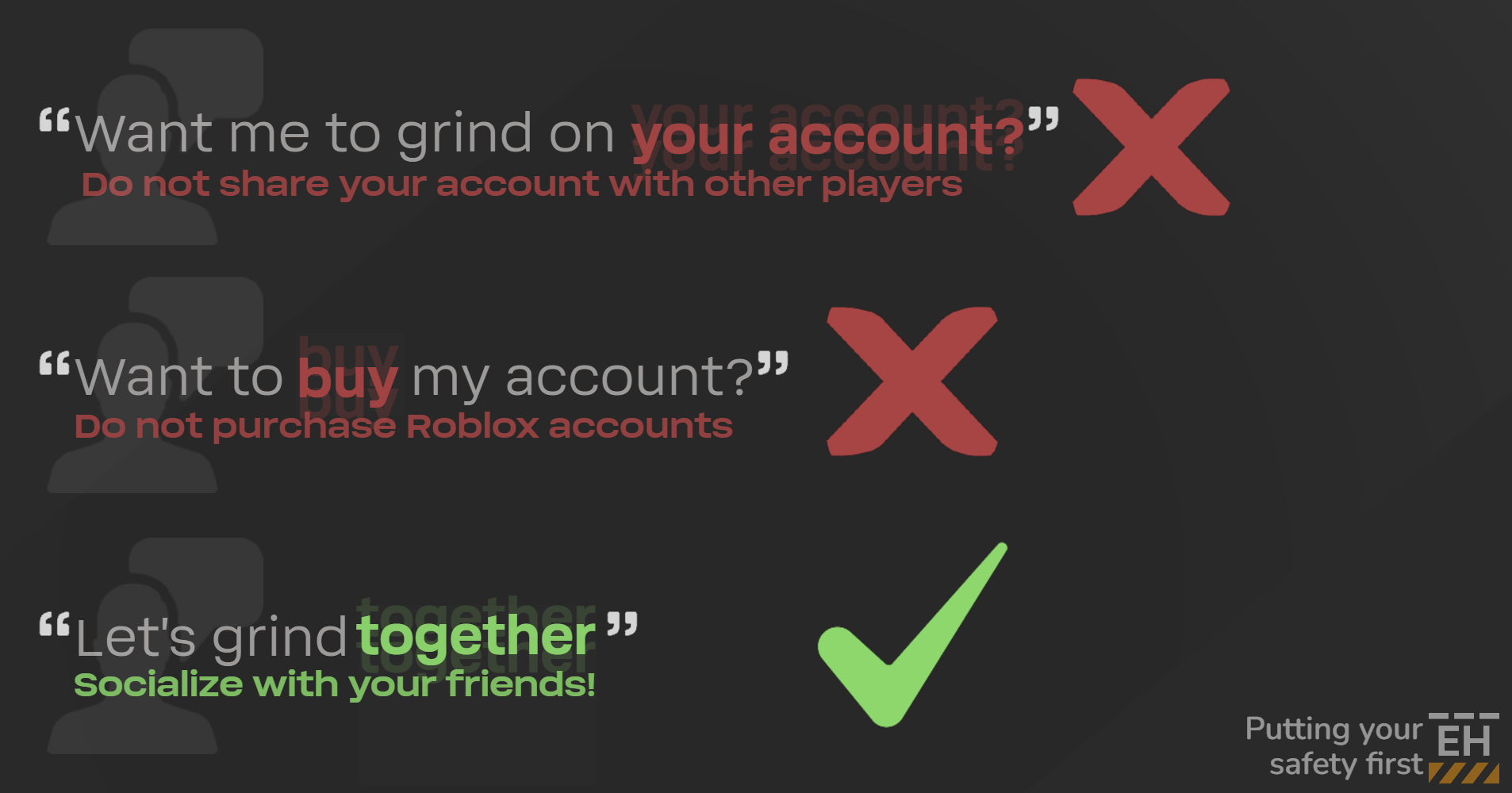
Scam Awareness
It is important for our players to understand how to stay safe when interacting with others online, particularly in Emergency Hamburg.
Parents should teach their children how to recognise scams, and any suspicious behaviour as this can help prevent problems before they occur.
Safety Reminders
- Moderators will never ask for your password
No member of the Emergency Hamburg team, or the Roblox staff team will ask for your account password

- Do not trust users with your account
Players should never allow others to log in to their account, even if the person is well known to you - Do not share private information
Personal information, such as real names, phone numbers, email accounts, should never be shared with other players
If your child encounters any suspicious behaviour, they should report this directly to Roblox through the report form:
Common Scams
Communication
Whilst many communication features are managed directly by Roblox, such as chat filters, and chat age requirements, Emergency Hamburg also provides additional features in-game.
This allows your child to interact with other players in-game.
Private Servers[3]
Emergency Hamburg allows players to create private servers[3:1], which are separate servers that can be used for roleplay, events, or playing with friends.
They can be purchased individually for 199 Robux[4], and are owned by the player who purchased them. Once created, the server owner can invite other players to either play, or help manage the server.
For a full overview of private servers[3:2], please visit:
It is important to note that we do not manage private servers[3:3]. The server owner is responsible for managing the behaviour of players within the server.

However, all players are still expected to follow both the Roblox Community Standards, and the Emergency Hamburg rules.
If the owner of a private server[3:4] is moderated, or suspended by our moderation team, their private server[3:5] will be closed.
Chat
Emergency Hamburg uses the Roblox chat system, which is designed to prevent inappropriate language, and to protect younger players.
New chat regulations allow players to communicate via voice and text with other users in similiar age groups, as provided in the image below.
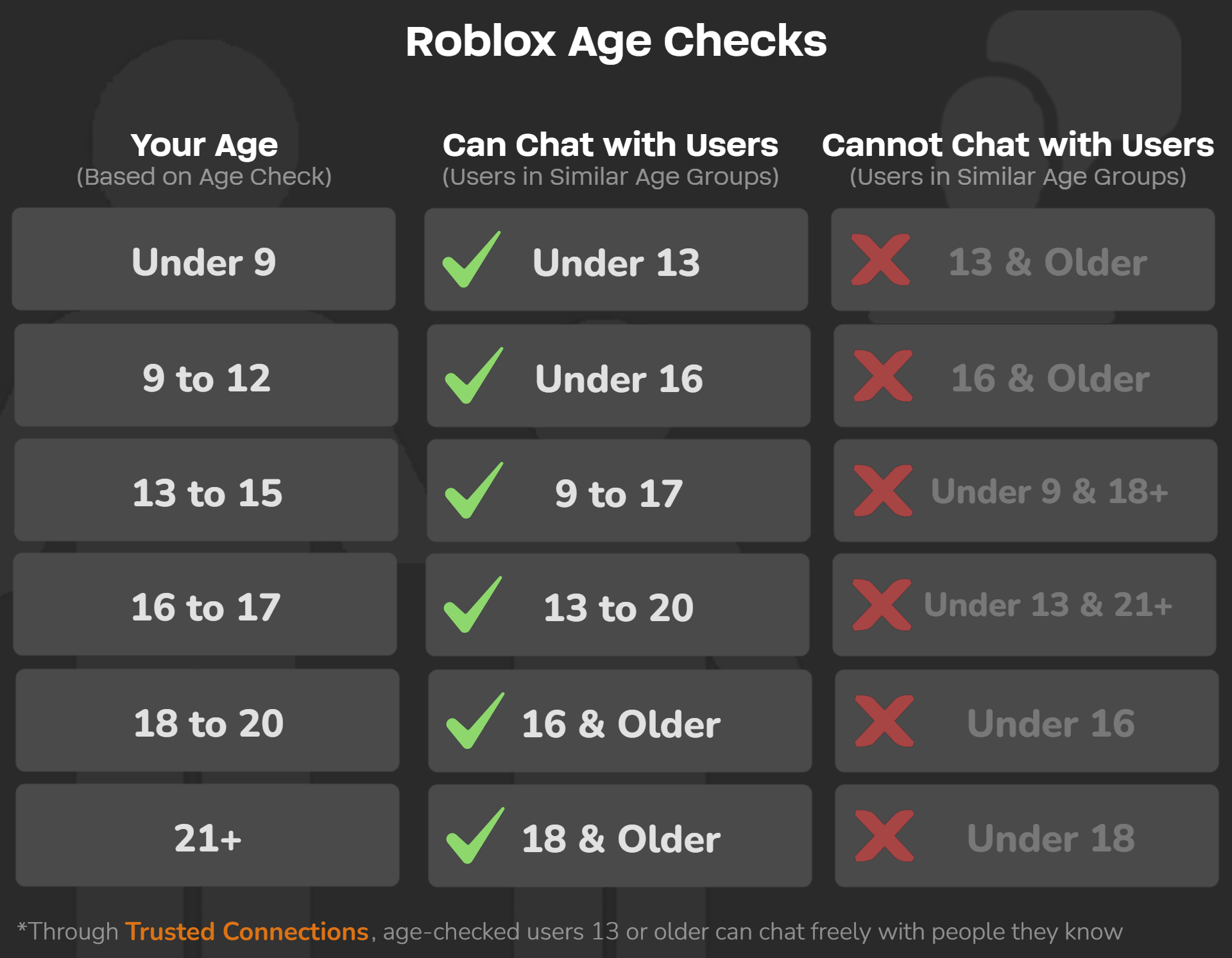
Roblox applies different chat restrictions depending on a player's age group[5], and account settings. Younger players, such as your child, may have limited communication features to ensure a safe experience.
We encourage parents to ensure their child has the correct date of birth selected, as this helps Roblox apply the appropriate safety settings.
Our Communication Safety Features
Emergency Hamburg also includes additional features for managing in-game communication. For example, your child can block other users through our in-game messaging application, prohibiting those players from communicating with your child to any extent.
Our messaging application also conforms to the aforementioned chat restrictions, preventing our players from communicating with those in different age groups.
Reporting Chat Violations
If your child encounters inappropriate messages or behaviour in chat, reports can be submitted through the Roblox report form.
These reports are actively reviewed by the Roblox moderation team, and may result in warnings, or account moderation.
You can learn more about how to report users on the platform here:
Monetization

It is important to note that Emergency Hamburg can be played without spending money.
While we provide optional purchases, they are not required to enjoy or progress in-game. Players can choose to purchase additional in-game content, such as:
- Gamepasses[6]
These provide permanent content expansions, such as additional vehicles - Early Unlocks
Players can purchase early vehicle unlocks for specific vehicles - Private Servers[3:6]
Players can purchase their own private servers, which can be used for roleplay[7], or playing with friends
How Purchases Work
Purchases within Emergency Hamburg are made using Robux[4:1], the virtual currency used across the Roblox platform. Robux[4:2] can be purchased using real money, and can then be used to unlock additional content across various games on the platform.
We deliberately avoid impulse purchases, such as random reward systems or loot boxes.
Our goal is to provide clear and transparent purchases, allowing parents, and their children, to understand exactly what they are buying.
When purchasing Robux[4:3], we recommend parents discuss with their child how the Robux[4:4] will be used. Whilst we focus on optional, transparent purchases, other games on the platform may encourage impulse purchases.
Parents should also review the spending controls, and parental settings available on their child's account, which can be found here:
Support
If you or your child need additional support, both Roblox, and Emergency Hamburg offer various support options.
Roblox
For account related issues, billing questions, or concerns about moderation, support is available directly through Roblox.
Roblox handles account issues, platform wide reports, and payment inquiries.
Emergency Hamburg
For issues specifically relating to Emergency Hamburg, support is available through our official website:
Our AI support assistant can help answer common questions, using information from this wiki. If further assistance is required, players can also speak to a moderator via our official Discord server in one of the public channels.
You can find answers to many common questions in our support wiki:
Please do not privately message moderators, or other staff members regarding your issues.
Glossary
- Content Maturity
The maturity level of an experience
- Content Maturity
- Content Maturity setting
A feature that controls which experiences your child can join based on
the experience’s content maturity level. These are:
• Minimal: May contain occasional mild violence and/or light unrealistic blood
• Mild: May contain repeated mild violence, heavy unrealistic blood, mild crude humor, and/or
mild fear
• Moderate: May contain moderate violence, light realistic blood, moderate crude humor,
unplayable gambling content, and/or moderate fear
• Restricted: May contain strong violence, heavy realistic blood, moderate crude humor,
romantic themes, unplayable gambling content, the presence of alcohol, strong language,
and/or moderate fear
- Content Maturity setting
- Private Server
A separate game server owned by a player, which can be used for roleplay, events, or to play with friends privately
- Private Server
- Robux
The virtual currency used on Roblox to purchase in-game content and features
- Robux
- Age Verification
A system used by Roblox to confirm a player's age, which may affect communication features
- Age Verification
- Gamepass
A one time purchase that unlocks permanent content or features within a game
- Gamepass
- Roleplay
A style of gameplay where players play realistically as different roles
- Roleplay